Product Journey
System Design
You have approved your requirements document and moved to the system design sprint. This is where Morph translates your requirements into a concrete technical architecture and implementation plan. You are reviewing that plan before any code is written.
Why system design exists
Requirements describe what you want to build.
System design defines how it will be built.
The same set of requirements can be implemented in different ways depending on:
Expected scale
Integration complexity
Security constraints
Infrastructure preferences
Performance expectations
System design makes those architectural decisions explicit so you can confirm the technical approach aligns with your context.
Once you approve system design and move to implementation, this architecture and sprint plan become the build inputs. Changes after this point require rework across affected components.
What's included
1. System Architecture
System Overview
A narrative description of the application’s technical structure and the role of each major component.
For example, with a simple expense tracking app, the overview might be described as follows:
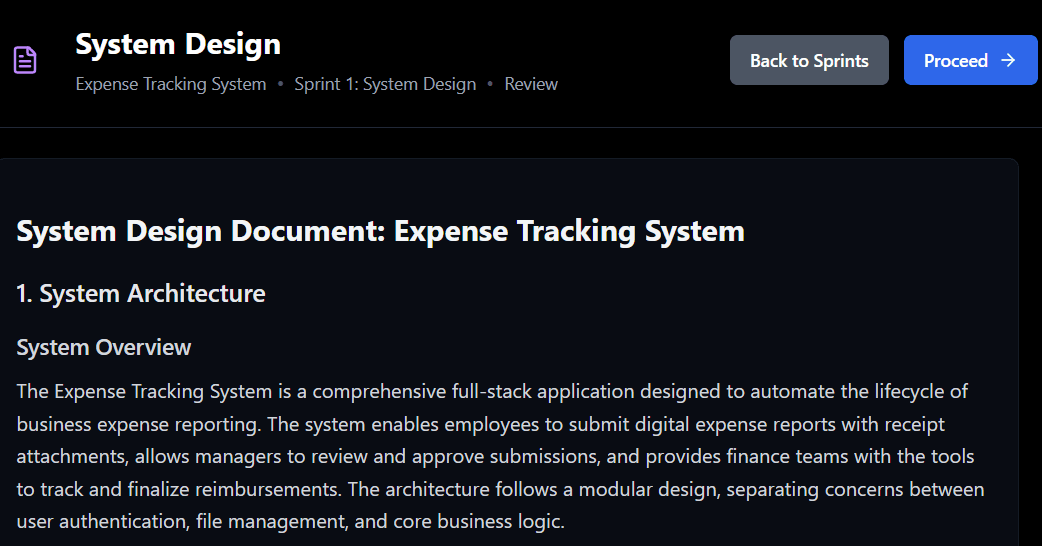
This section provides:
A narrative summary of the application’s technical structure
A description of the core responsibilities of the system
An explanation of how the architecture supports the required workflows
Architecture Diagram
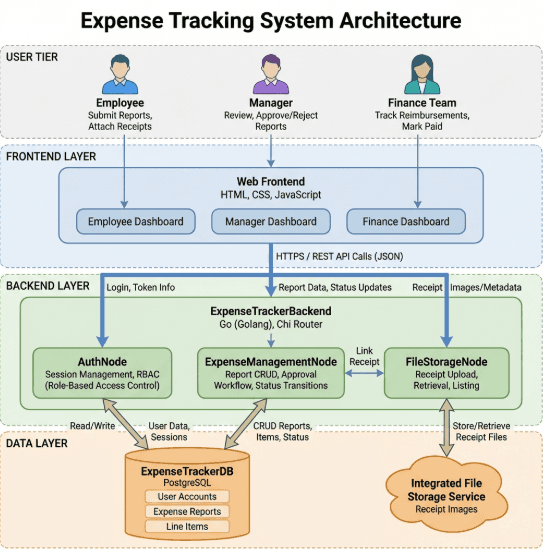
A visual representation of the system's layers and how they connect, typically showing the user tier, frontend layer, backend layer, and data layer. The diagram also identifies integration points with any external systems.
The diagram provides a visual representation of the system’s layers and how they connect.
Using the expense tracking example, this includes:
User Tier (Employee, Manager, Finance)
Frontend Layer (Web interface and dashboards)
Backend Layer (API services and business logic)
Data Layer (Database and file storage services)
External integration points where applicable
This diagram reflects the approved requirements for this specific project. Different applications may produce different architectural structures depending on scope and constraints.
You are not validating implementation detail at this stage. Focus on whether the architectural structure aligns with your use case and constraints.
Component Descriptions
A breakdown of each major system component and its responsibility.
With the expense tracking example, this might include some of the following:
Backend API service handling business logic and data orchestration
Database managing users, expense reports, and workflow state
Authentication and role management for secure login and access control
Core expense management module handling report lifecycle transitions
File storage for uploads and retrieval
Web frontend providing role-specific dashboards
Technology Stack
The specific technologies chosen for each layer of the application. This often includes defined frontend, backend, database, and storage technologies.
If you have infrastructure constraints or must integrate with existing systems, verify the technology choices are compatible with your environment.
Supported Functionalities
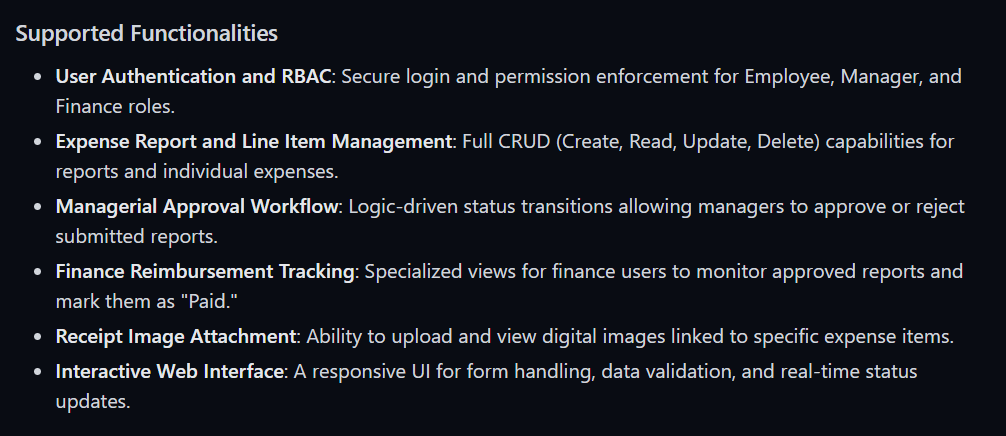
The features that will be built during implementation. This mirrors the supported functionalities from your requirements document, organized to reflect the technical architecture. Confirm all expected features from requirements are present here.
With the expense tracking app, this might include:
Assisted Functionalities
Features flagged in requirements as requiring manual engineering. This section explains how each will be handled, either through alternative implementations within current capabilities or noted for custom development.
Morph is rapidly expanding what can be built autonomously, and some assisted items may become supported as the platform evolves. If assisted features have been redesigned to use currently supported approaches, verify those alternatives meet your needs. For questions about roadmap timing or custom implementation, reach out to us: team@morph.systems
2. Implementation Plan
Development Sprints
The implementation plan breaks the build into sequenced sprints.
Each sprint includes:
The components or features being built
Dependencies on earlier sprints
Estimated credits
Sprint sequencing is derived from architectural dependencies.
In the expense tracking app example we might have:
Infrastructure components (e.g., storage, authentication) are built first
Core business logic follows
Auxiliary functionality comes after foundational systems are stable
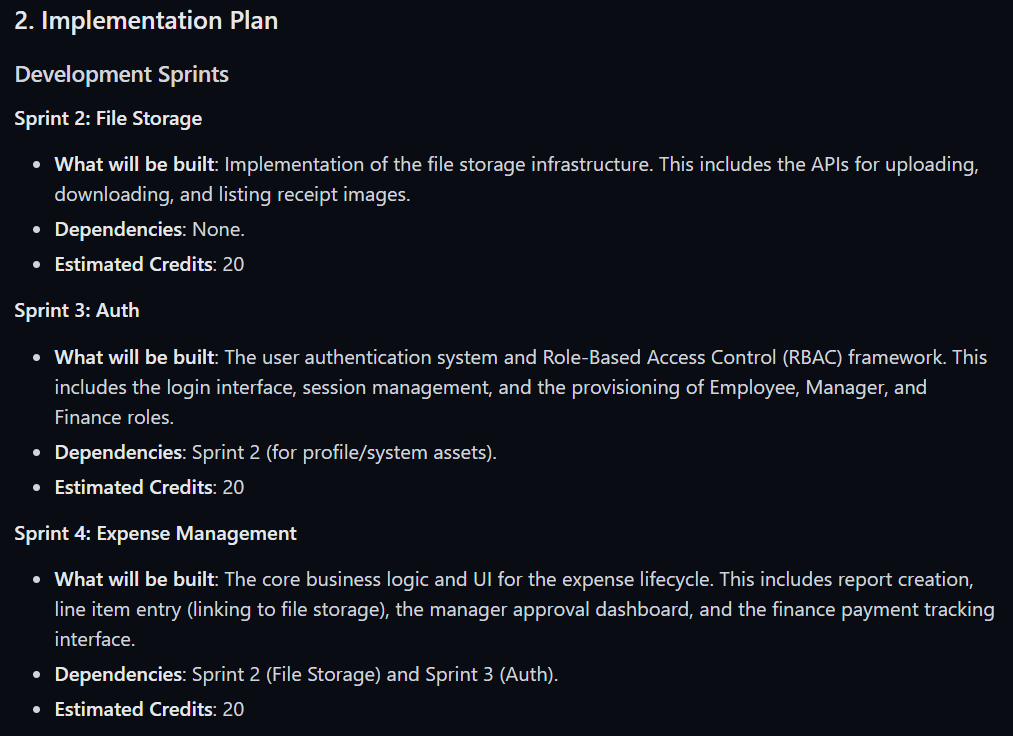
Sprint names and order are project-specific. A typical sequence covers authentication and core infrastructure first, then business logic and workflows, then integrations and auxiliary features.
Implementation Order
An explanation of why sprints are sequenced in a particular order.
As an example,
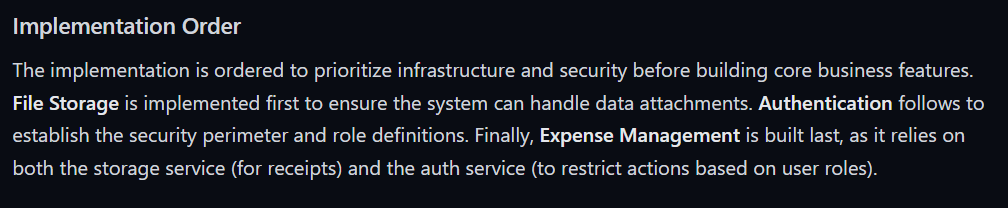
Foundational components like authentication and database structure are built first so that business logic has everything it needs to function correctly. Auxiliary features and enhancements come last, once the primary data flows are stable.
The sequencing is optimized to reduce rework and ensures dependencies are satisfied before higher-level functionality is built.
How to review this document
Confirm architectural alignment
If you have:
Existing identity providers
Required integration systems
Mandated infrastructure
Performance constraints
Verify the proposed architecture supports those requirements.
Check the implementation sequence
Review sprint dependencies and order. Critical workflows should appear early enough in the plan to validate them before significant build effort is spent elsewhere.
If essential business functionality appears late in the plan, raise that before approval.
Confirm scope in each sprint
Every capability from your approved requirements should map to:
A component
A sprint
A defined implementation path
If something is missing, revisit requirements before proceeding.
Evaluate assisted functionality alternatives
If assisted features have been replaced with alternative approaches, confirm those alternatives meet your actual business needs. If not, adjust scope or discuss manual implementation support before approval.
Review estimated credits
Review total credits across sprints. If the total exceeds your expectations, you have several options:
Phase the build into smaller milestones
Reduce scope by prioritizing critical workflows
Revisit requirements to simplify complex features
Reach out to the Morph team to discuss tradeoffs, sequencing, or alternative approaches
What to do at this stage
If the approach looks good: Approve the system design to move into implementation. Morph will begin building according to this plan.
If you have questions about technical decisions or critical features missing: Reach out to the Morph team via in-app chat or email team@morph.systems to discuss specific architectural choices or technology selections.
If scope or cost is larger than expected: Consider phasing the build, reducing scope, adjusting requirements to fit your budget and timeline, or contact us to discuss alternatives or assistance
When you're ready to proceed
Once you have reviewed this document and confirmed the technical approach aligns with your needs, approve it by selecting Proceed in the top right corner of the screen.
By proceeding, you are confirming that you want the application built according to this architecture and sprint plan. Until you approve, you can request clarifications by directly reaching out to our team via in-app chat (bottom right) or team@morph.systems
Related documentation
Requirements & System Overview - The business specifications that informed this technical design
Quick Start Guide - A fast overview to get started with your first Morph project
Why system design exists
Requirements describe what you want to build.
System design defines how it will be built.
The same set of requirements can be implemented in different ways depending on:
Expected scale
Integration complexity
Security constraints
Infrastructure preferences
Performance expectations
System design makes those architectural decisions explicit so you can confirm the technical approach aligns with your context.
Once you approve system design and move to implementation, this architecture and sprint plan become the build inputs. Changes after this point require rework across affected components.
What's included
1. System Architecture
System Overview
A narrative description of the application’s technical structure and the role of each major component.
For example, with a simple expense tracking app, the overview might be described as follows:

This section provides:
A narrative summary of the application’s technical structure
A description of the core responsibilities of the system
An explanation of how the architecture supports the required workflows
Architecture Diagram

A visual representation of the system's layers and how they connect, typically showing the user tier, frontend layer, backend layer, and data layer. The diagram also identifies integration points with any external systems.
The diagram provides a visual representation of the system’s layers and how they connect.
Using the expense tracking example, this includes:
User Tier (Employee, Manager, Finance)
Frontend Layer (Web interface and dashboards)
Backend Layer (API services and business logic)
Data Layer (Database and file storage services)
External integration points where applicable
This diagram reflects the approved requirements for this specific project. Different applications may produce different architectural structures depending on scope and constraints.
You are not validating implementation detail at this stage. Focus on whether the architectural structure aligns with your use case and constraints.
Component Descriptions
A breakdown of each major system component and its responsibility.
With the expense tracking example, this might include some of the following:
Backend API service handling business logic and data orchestration
Database managing users, expense reports, and workflow state
Authentication and role management for secure login and access control
Core expense management module handling report lifecycle transitions
File storage for uploads and retrieval
Web frontend providing role-specific dashboards
Technology Stack
The specific technologies chosen for each layer of the application. This often includes defined frontend, backend, database, and storage technologies.
If you have infrastructure constraints or must integrate with existing systems, verify the technology choices are compatible with your environment.
Supported Functionalities
The features that will be built during implementation. This mirrors the supported functionalities from your requirements document, organized to reflect the technical architecture. Confirm all expected features from requirements are present here.
With the expense tracking app, this might include:

Assisted Functionalities
Features flagged in requirements as requiring manual engineering. This section explains how each will be handled, either through alternative implementations within current capabilities or noted for custom development.
Morph is rapidly expanding what can be built autonomously, and some assisted items may become supported as the platform evolves. If assisted features have been redesigned to use currently supported approaches, verify those alternatives meet your needs. For questions about roadmap timing or custom implementation, reach out to us: team@morph.systems
2. Implementation Plan
Development Sprints
The implementation plan breaks the build into sequenced sprints.
Each sprint includes:
The components or features being built
Dependencies on earlier sprints
Estimated credits
Sprint sequencing is derived from architectural dependencies.
In the expense tracking app example we might have:
Infrastructure components (e.g., storage, authentication) are built first
Core business logic follows
Auxiliary functionality comes after foundational systems are stable

Sprint names and order are project-specific. A typical sequence covers authentication and core infrastructure first, then business logic and workflows, then integrations and auxiliary features.
Implementation Order
An explanation of why sprints are sequenced in a particular order.
As an example,

Foundational components like authentication and database structure are built first so that business logic has everything it needs to function correctly. Auxiliary features and enhancements come last, once the primary data flows are stable.
The sequencing is optimized to reduce rework and ensures dependencies are satisfied before higher-level functionality is built.
How to review this document
Confirm architectural alignment
If you have:
Existing identity providers
Required integration systems
Mandated infrastructure
Performance constraints
Verify the proposed architecture supports those requirements.
Check the implementation sequence
Review sprint dependencies and order. Critical workflows should appear early enough in the plan to validate them before significant build effort is spent elsewhere.
If essential business functionality appears late in the plan, raise that before approval.
Confirm scope in each sprint
Every capability from your approved requirements should map to:
A component
A sprint
A defined implementation path
If something is missing, revisit requirements before proceeding.
Evaluate assisted functionality alternatives
If assisted features have been replaced with alternative approaches, confirm those alternatives meet your actual business needs. If not, adjust scope or discuss manual implementation support before approval.
Review estimated credits
Review total credits across sprints. If the total exceeds your expectations, you have several options:
Phase the build into smaller milestones
Reduce scope by prioritizing critical workflows
Revisit requirements to simplify complex features
Reach out to the Morph team to discuss tradeoffs, sequencing, or alternative approaches
What to do at this stage
If the approach looks good: Approve the system design to move into implementation. Morph will begin building according to this plan.
If you have questions about technical decisions or critical features missing: Reach out to the Morph team via in-app chat or email team@morph.systems to discuss specific architectural choices or technology selections.
If scope or cost is larger than expected: Consider phasing the build, reducing scope, adjusting requirements to fit your budget and timeline, or contact us to discuss alternatives or assistance
When you're ready to proceed
Once you have reviewed this document and confirmed the technical approach aligns with your needs, approve it by selecting Proceed in the top right corner of the screen.
By proceeding, you are confirming that you want the application built according to this architecture and sprint plan. Until you approve, you can request clarifications by directly reaching out to our team via in-app chat (bottom right) or team@morph.systems
Related documentation
Requirements & System Overview - The business specifications that informed this technical design
Quick Start Guide - A fast overview to get started with your first Morph project

