Product Journey
Requirements & System Overview
This phase turns your initial idea into a structured specification and a high-level system overview.
Starting your project
When you begin a new project in Morph, the first step is describing what you want to build. This happens through a conversation with the requirements agent.
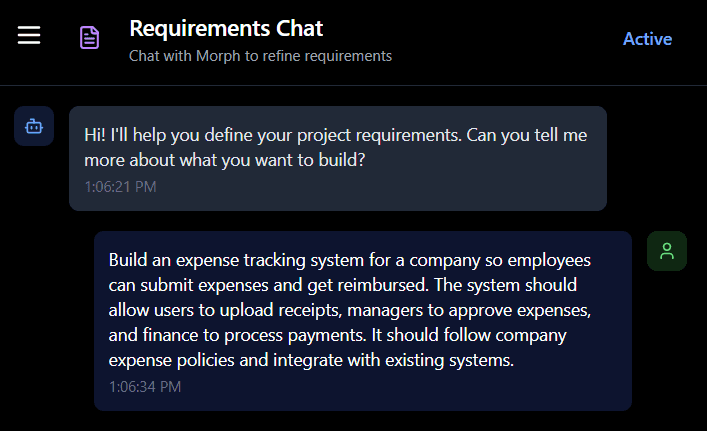
You'll start by providing an initial description. This can be as brief or detailed as you want. For example this request to build an expense tracking system:
Working with the requirements agent
How the conversation works
The agent's job is to help you think through what you're building and surface details that will matter during the build. Depending on how much detail you provided upfront, the agent will ask clarifying questions.
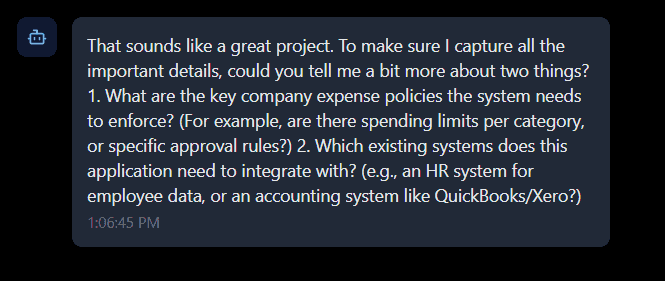
If your initial description is comprehensive, the agent may have everything it needs and move directly to generating the structured requirements document. If your description leaves gaps, the agent will ask follow-up questions. Common questions include:
Which existing systems does this need to integrate with?
What file types and formats should be supported for uploads?
What specific business rules or policies need to be enforced?
Who needs access to what, and what are the approval workflows?
Are there validation requirements, thresholds, or constraints?
What the agent is doing
The agent is helping you think through production requirements you might not have considered. Questions about error handling, edge cases, integrations, and business rules are the agent making sure nothing critical gets missed. You don't need to have all the answers immediately. You can work through the conversation iteratively.
The structured requirements document
What gets generated
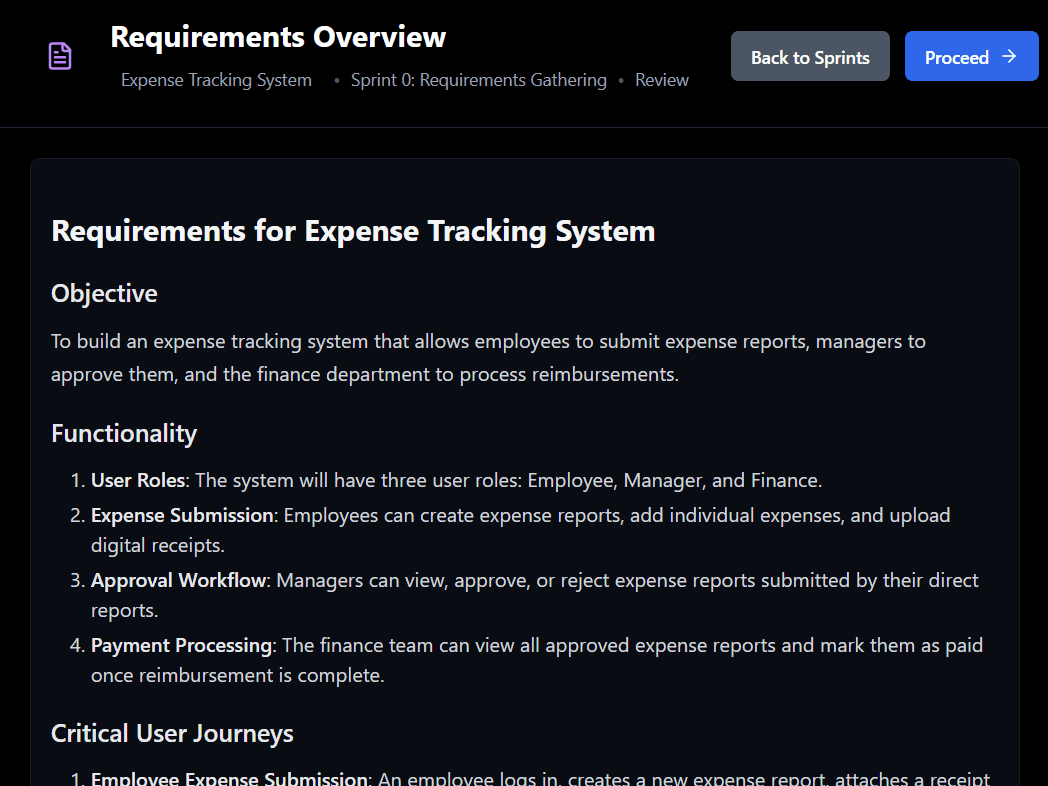
Once the agent has sufficient information, it generates a formal requirements document that translates your conversational description into a structured specification. This is your opportunity to verify that Morph understood your intent correctly before any architectural decisions are made.
Why this document exists
Requirements conversations are naturally ambiguous. Some gaps only become visible once requirements are structured formally. This document surfaces those gaps early, when changes are inexpensive to make.
By the time you approve this and move to system design, Morph will use every detail here to make architectural decisions. Data models inform database design. User journeys shape API structure. Supported vs. assisted capabilities determine what gets built autonomously vs. what requires manual implementation support.
What's included
Objective
The high-level goal of your application in a single paragraph. This captures the core problem you're solving and for whom.
For example: To build an expense tracking system that allows employees to submit expense reports, managers to approve them, and the finance department to process reimbursements.
Functionality
A numbered list of the major capabilities your application will have. These are feature-level descriptions outlining what the system will do.
Critical User Journeys
Step-by-step descriptions of how users will accomplish key tasks in your application, covering the workflows that matter most.
System Overview
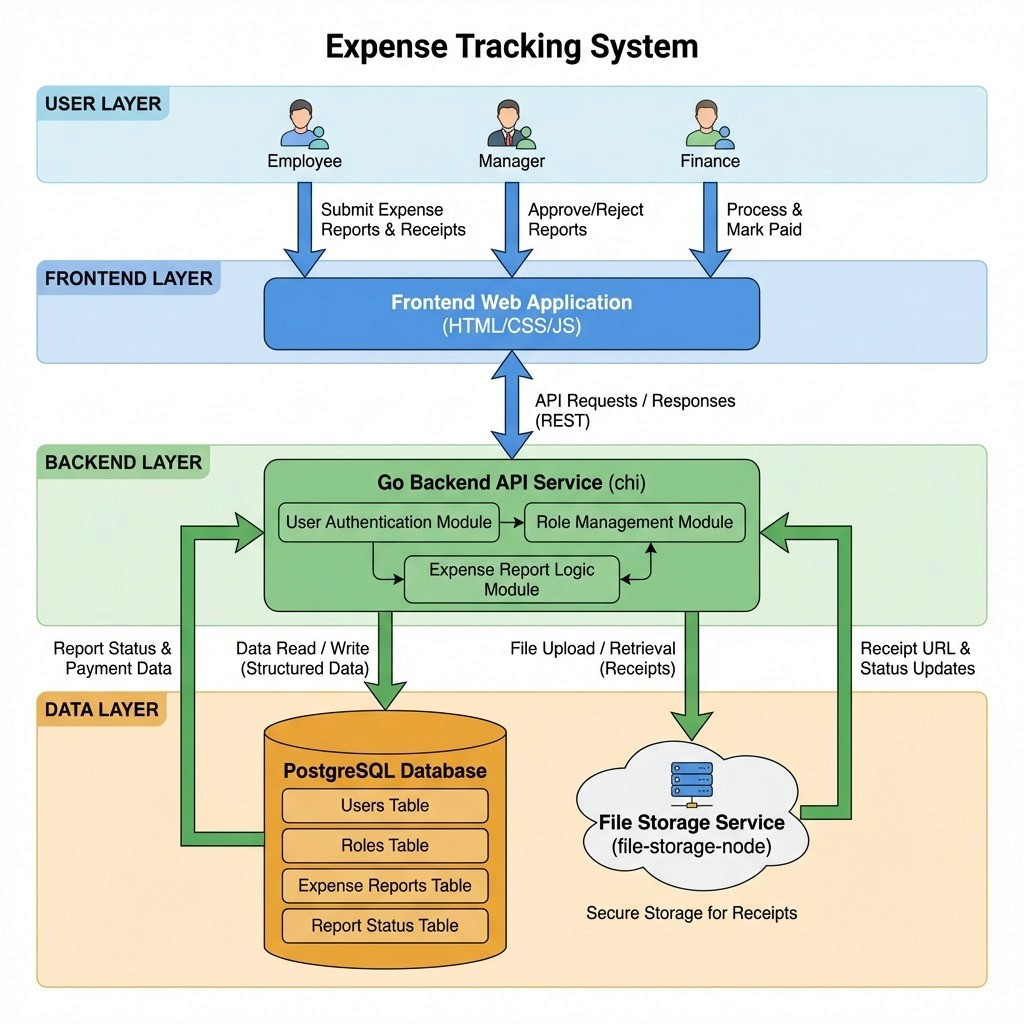
This section is where Morph translates your business requirements into a technical architecture, showing you the proposed components and how they work together.
The System Overview describes:
Architecture description: A narrative explaining the overall structure and how components relate
Component breakdown: Each major system component listed with its role, including frontend, backend, database, and any specialized services
Supported vs. Assisted indicators: Each component flagged as either Supported (Morph builds autonomously) or Assisted (requires human engineering)
Architecture diagram: A visual showing how components connect and data flows through the system
You are not expected to validate detailed technical choices at this stage. Focus on whether the listed components align with your requirements and constraints.
Supported vs. Assisted Capabilities
Morph classifies each capability in the generated specification as either Supported or Assisted.
Supported capabilities can be built autonomously using Morph’s current product capabilities.
Assisted capabilities require human engineering support, typically due to external integrations or specialized logic beyond the platform’s autonomous build surface.
Below is an example classification from the expense tracking system used throughout this documentation. This example is illustrative and reflects the scope of that specific application, not the full set of capabilities supported by Morph.
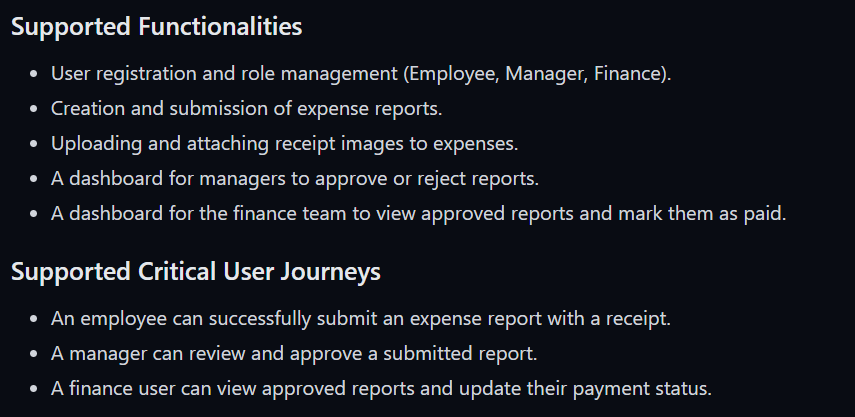
Capabilities marked Assisted may impact timeline or cost. Morph continuously expands what can be built autonomously, and some assisted capabilities may transition to supported as the platform evolves.
If a required capability is marked Assisted and is critical for launch, you can:
Wait for platform support. Many assisted capabilities are on the near-term roadmap.
Engage the Morph team for custom implementation
Adjust scope or redesign using currently supported approaches
For roadmap timing or custom implementation options, contact team@morph.systems
How to review this phase
Read it like a contract
This document defines what Morph will build. Anything not specified here won't appear in system design or implementation. If you find yourself thinking "I assumed that would be included," note those gaps now and address them with the requirements agent before proceeding. Changes can be easily made in this phase but can compound in cost once implementation begins.
Look for precision, not perfection
You're not checking code quality or technical implementation. You're checking whether Morph understood your intent correctly. Vague entries like "users can manage data" should be expanded. What does "manage" mean exactly? If something feels unclear or incomplete, that's a signal to add detail through the requirements agent before moving forward.
Validate workflows
For each Critical User Journey, confirm:
Every step in the workflow is supported by listed functionality.
Required states, transitions, and permissions are defined.
Edge paths are handled (approval rejection, revision, escalation).
If a workflow describes an action, the functionality list should explicitly support it. If functionality exists, it should appear in at least one workflow.
Sanity-check the architecture
The System Overview shows you the technical approach at a high level. If you have constraints (must work offline, needs to integrate with specific systems, has strict security requirements), verify they're reflected in what's listed.
What to do if something's wrong
Minor clarifications can be handled through the chat. Something like: "Expense reports should also track submission dates, not just line item dates."
Significant gaps (entire features or workflows that are missing) warrant a fuller conversation with the requirements agent to capture what's needed.
Scope reduction makes sense if assisted capabilities are extensive and you want more autonomy. Consider simplifying features or deferring complex functionality to a later phase.
Architecture concerns should be added as requirements so system design can adjust. If the proposed approach doesn't align with your infrastructure constraints or integration requirements, specify those constraints directly.
Fundamental misunderstanding of your objective means restarting requirements gathering with more specific framing.
When you're ready to proceed
Once you've reviewed this document and made any necessary refinements, you can approve it by selecting Proceed in the top right corner of the screen.
By proceeding, you're confirming: "Yes, this accurately captures what I want to build." Morph will use these requirements as the foundation for all subsequent phases.
Until you select Proceed, you can add clarifications and refine details as needed. Once you move beyond the requirements phase, these specifications become locked as build inputs. Changes at that point trigger rework across affected components, so the time to address gaps is now.
Related documentation
System Design — How Morph translates requirements into technical architecture
Requirements (Core Concepts) — Understanding what makes requirements effective
Quick Start Guide — A fast overview to get started with your first Morph project
Starting your project
When you begin a new project in Morph, the first step is describing what you want to build. This happens through a conversation with the requirements agent.
You'll start by providing an initial description. This can be as brief or detailed as you want. For example this request to build an expense tracking system:

Working with the requirements agent
How the conversation works
The agent's job is to help you think through what you're building and surface details that will matter during the build. Depending on how much detail you provided upfront, the agent will ask clarifying questions.
If your initial description is comprehensive, the agent may have everything it needs and move directly to generating the structured requirements document. If your description leaves gaps, the agent will ask follow-up questions. Common questions include:
Which existing systems does this need to integrate with?
What file types and formats should be supported for uploads?
What specific business rules or policies need to be enforced?
Who needs access to what, and what are the approval workflows?
Are there validation requirements, thresholds, or constraints?

What the agent is doing
The agent is helping you think through production requirements you might not have considered. Questions about error handling, edge cases, integrations, and business rules are the agent making sure nothing critical gets missed. You don't need to have all the answers immediately. You can work through the conversation iteratively.
The structured requirements document
What gets generated
Once the agent has sufficient information, it generates a formal requirements document that translates your conversational description into a structured specification. This is your opportunity to verify that Morph understood your intent correctly before any architectural decisions are made.
Why this document exists
Requirements conversations are naturally ambiguous. Some gaps only become visible once requirements are structured formally. This document surfaces those gaps early, when changes are inexpensive to make.
By the time you approve this and move to system design, Morph will use every detail here to make architectural decisions. Data models inform database design. User journeys shape API structure. Supported vs. assisted capabilities determine what gets built autonomously vs. what requires manual implementation support.
What's included

Objective
The high-level goal of your application in a single paragraph. This captures the core problem you're solving and for whom.
For example: To build an expense tracking system that allows employees to submit expense reports, managers to approve them, and the finance department to process reimbursements.
Functionality
A numbered list of the major capabilities your application will have. These are feature-level descriptions outlining what the system will do.
Critical User Journeys
Step-by-step descriptions of how users will accomplish key tasks in your application, covering the workflows that matter most.
System Overview
This section is where Morph translates your business requirements into a technical architecture, showing you the proposed components and how they work together.
The System Overview describes:
Architecture description: A narrative explaining the overall structure and how components relate
Component breakdown: Each major system component listed with its role, including frontend, backend, database, and any specialized services
Supported vs. Assisted indicators: Each component flagged as either Supported (Morph builds autonomously) or Assisted (requires human engineering)
Architecture diagram: A visual showing how components connect and data flows through the system

You are not expected to validate detailed technical choices at this stage. Focus on whether the listed components align with your requirements and constraints.
Supported vs. Assisted Capabilities
Morph classifies each capability in the generated specification as either Supported or Assisted.
Supported capabilities can be built autonomously using Morph’s current product capabilities.
Assisted capabilities require human engineering support, typically due to external integrations or specialized logic beyond the platform’s autonomous build surface.
Below is an example classification from the expense tracking system used throughout this documentation. This example is illustrative and reflects the scope of that specific application, not the full set of capabilities supported by Morph.

Capabilities marked Assisted may impact timeline or cost. Morph continuously expands what can be built autonomously, and some assisted capabilities may transition to supported as the platform evolves.
If a required capability is marked Assisted and is critical for launch, you can:
Wait for platform support. Many assisted capabilities are on the near-term roadmap.
Engage the Morph team for custom implementation
Adjust scope or redesign using currently supported approaches
For roadmap timing or custom implementation options, contact team@morph.systems
How to review this phase
Read it like a contract
This document defines what Morph will build. Anything not specified here won't appear in system design or implementation. If you find yourself thinking "I assumed that would be included," note those gaps now and address them with the requirements agent before proceeding. Changes can be easily made in this phase but can compound in cost once implementation begins.
Look for precision, not perfection
You're not checking code quality or technical implementation. You're checking whether Morph understood your intent correctly. Vague entries like "users can manage data" should be expanded. What does "manage" mean exactly? If something feels unclear or incomplete, that's a signal to add detail through the requirements agent before moving forward.
Validate workflows
For each Critical User Journey, confirm:
Every step in the workflow is supported by listed functionality.
Required states, transitions, and permissions are defined.
Edge paths are handled (approval rejection, revision, escalation).
If a workflow describes an action, the functionality list should explicitly support it. If functionality exists, it should appear in at least one workflow.
Sanity-check the architecture
The System Overview shows you the technical approach at a high level. If you have constraints (must work offline, needs to integrate with specific systems, has strict security requirements), verify they're reflected in what's listed.
What to do if something's wrong
Minor clarifications can be handled through the chat. Something like: "Expense reports should also track submission dates, not just line item dates."
Significant gaps (entire features or workflows that are missing) warrant a fuller conversation with the requirements agent to capture what's needed.
Scope reduction makes sense if assisted capabilities are extensive and you want more autonomy. Consider simplifying features or deferring complex functionality to a later phase.
Architecture concerns should be added as requirements so system design can adjust. If the proposed approach doesn't align with your infrastructure constraints or integration requirements, specify those constraints directly.
Fundamental misunderstanding of your objective means restarting requirements gathering with more specific framing.
When you're ready to proceed
Once you've reviewed this document and made any necessary refinements, you can approve it by selecting Proceed in the top right corner of the screen.
By proceeding, you're confirming: "Yes, this accurately captures what I want to build." Morph will use these requirements as the foundation for all subsequent phases.
Until you select Proceed, you can add clarifications and refine details as needed. Once you move beyond the requirements phase, these specifications become locked as build inputs. Changes at that point trigger rework across affected components, so the time to address gaps is now.
Related documentation
System Design — How Morph translates requirements into technical architecture
Requirements (Core Concepts) — Understanding what makes requirements effective
Quick Start Guide — A fast overview to get started with your first Morph project

